
Your follow-up.
Handled.
An AI-forward CRM that answers calls, follows up with leads and books appointments. Choose the AI model that fits the task, all in one connected platform.
From first hello to booked
Illustrative workflow
- New lead
- Conversation
- Qualified
- Appointment
Inside Surge CRM.
Your assistant, inbox and daily work.
Here’s how they look in the actual platform.
Start with what you want to get done.
A workspace for your questions, instructions and ongoing AI conversations. Chats, scheduled tasks, workers and web apps have their own place beside the assistant.
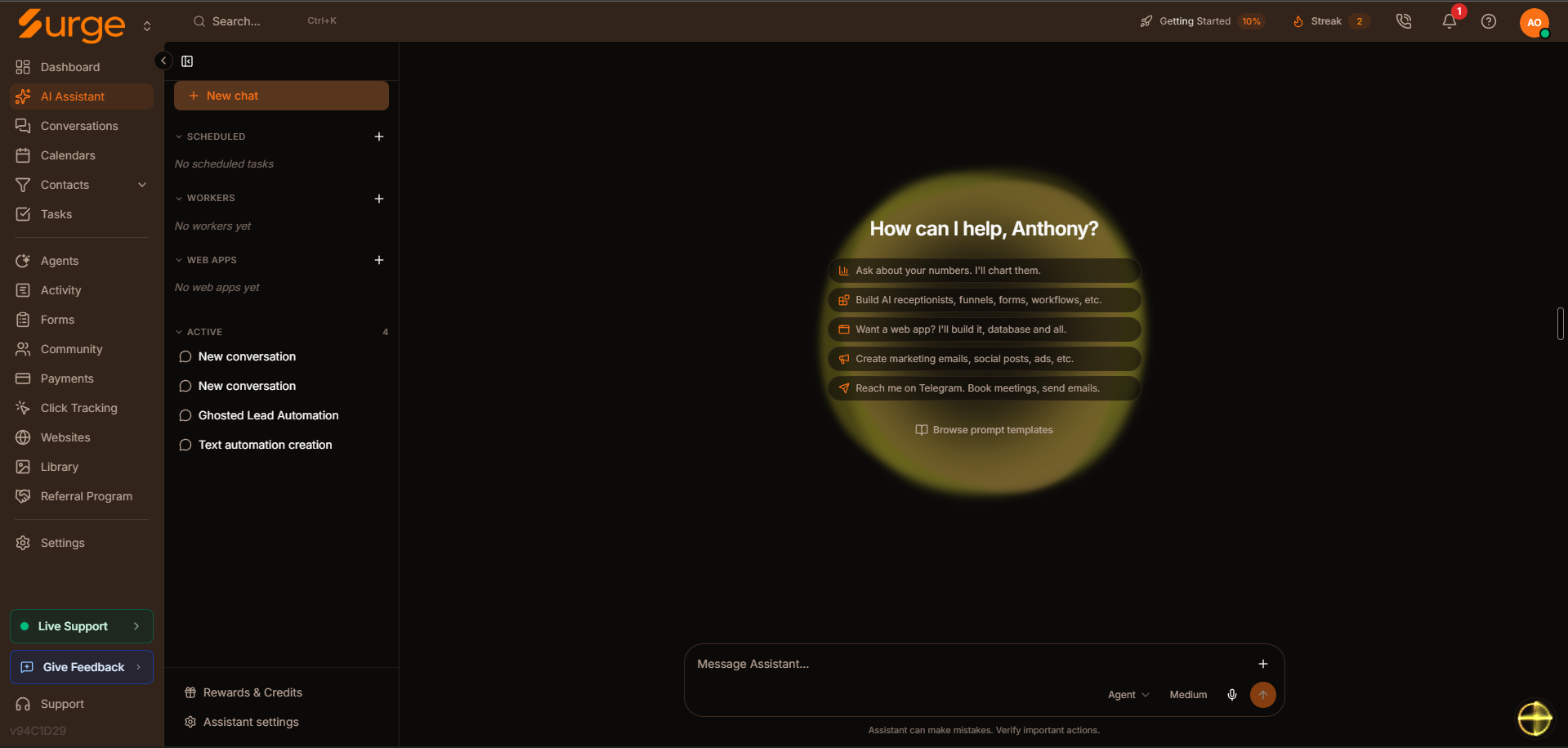
- Ask about your business
- Describe a workflow
- Return to an ongoing chat
Three AI roles.
One connected system.
From your instructions to a booked estimate. Follow one lead through the work.
Alex Morgan
Water heater estimate · One shared contact
You describe the work.
Build an estimate follow-up that collects the details, checks the calendar and keeps your team informed.
Your instruction
“When someone asks for an estimate, get the details and help them book.”
A workflow starts with your instructions
Review example draft
Example conversation · You + Surge AI
You
Build a follow-up for new inquiries.
The next steps get organized.
The same inquiry becomes a contact, a task and a next step for your team.
Alex’s CRM record
- Inquiry received
- Contact update pending
- Follow-up task pending
Your customer gets an answer.
The agent uses the conversation to qualify the request and confirm a time.
The conversation continues
Alex: “Can I book an estimate for tomorrow?”
Surge checks the service details and your calendar.
Waiting for a confirmed time
Your instructions, customer context and next steps stay connected.
Illustrative scenario. Workflows and agents follow your configuration.
Your team and AI.
On the same lines.
Simultaneous calls means calls happening at the same time. Your people and AI share the account’s capacity.
Illustrative example: 3 team calls + 5 AI calls + 3 open lines.
Illustrative capacity · Not a daily call limit
11 concurrent calls included. Additional call slots are $9 per slot; voice usage is billed separately.
Same system.
Your way of working.
Built for businesses that run on calls, texts and appointments. The setup changes with your business.
An after-hours estimate request.
- Answer the inquiry and collect the project details.
- Check availability and confirm the appointment.
- Send your team the conversation and next step.
Example scenario, not customer results
Home services·Legal·Dental·Aesthetics·Real estate·Insurance·Automotive·Pet services·Fitness·Education·Local businesses
Your choice of AI.
Connected to your business.
Choose from a broad range of built-in models for conversations, content and automation. Keep the work inside your CRM.
Anthropic
Claude Sonnet 5
Gemini 3.1 Pro
OpenAI
GPT-5.6
Examples of available models. Availability depends on the feature. AI usage is metered separately.
Explore Surge pricingGive every conversation the right context.
An example instruction
“Answer an estimate request using my service information and booking rules.”
An agent can qualify the inquiry, check availability and carry the conversation forward.
Illustrative tasks. Review outputs and configure actions before going live.
Bring the AI that knows your business.
Surge CRM’s custom MCP connects to Claude, Codex and ChatGPT. Bring your preferred AI into the work of shaping your CRM around your business.
If you talk to your AI as much as we do, you’ve already shared the story: what worked, what didn’t, what you learned and where you want to go. Put that context to work when you ask it to help build your CRM.
Your Surge MCP server
https://app.surgescales.com/mcpAdd this URL in your AI app’s MCP settings, then sign in to Surge when prompted.
Connect your preferred AI
- Setup guide
Claude
Remote custom connector
- Setup guide
Codex
Custom MCP server
- Setup guide
ChatGPT
Custom MCP app · Developer mode
Connection options depend on your AI app, plan and workspace permissions. Choose the model within the connected app.
“Use what I’ve shared about my business to help shape my pipeline, follow-up and workflows in Surge CRM.”
Start with the business context already available to your AI, then work together on a CRM that fits how you operate.
Example prompt. Available context depends on your AI app, conversation and memory settings. Connecting MCP doesn’t automatically share your full chat history.
AI that does
the follow-up.
Included in your subscription. Set up around your business, with your team in control.
View pricingAnswer inbound calls
Handle questions, gather details and route the caller.
Follow up with opted-in leads
Keep approved conversations moving by phone or text.
Understand the reply
Sort intent, save details and handle opt-outs.
Book the appointment
Check availability, confirm the time and update the calendar.
Choose the model for the job
A broad range of AI models, built in for conversations, content and automation. Model usage is metered separately.
Build by describing it
Describe a workflow, then review what the builder creates.
Simple to start.
Room to go deeper.
Branching, waits, knowledge lookups and human handoff are there when you need them.
Understand intent
The reply determines the next step.
Check calendar
Offer an available time, confirm it, then create the appointment.
Your booking rules stay in control.
Illustrative workflow · Tap either reply to see the handoff.
Replies, bookings and opt-outs change the next step.
Your stack,
brought together.
Building, conversations and follow-up in one connected workspace.
| Capability | Separate-tool examples | Surge CRM |
|---|---|---|
AI Agent | Vapi · Bland AI · Retell AI | Talk, qualify and book |
CRM & Pipeline Management | HubSpot · Pipedrive · Salesforce | Manage contacts and deals |
2-Way SMS Marketing | SimpleTexting · EZTexting | Text from one inbox |
Booking & Appointments | Calendly · Acuity | Book from a conversation |
Workflow Automations | Zapier · Make · n8n | Connect the next steps |
Tool names illustrate categories, not feature-for-feature replacements. Feature availability, limits and usage charges depend on your plan and configuration.
Explore the full platform
| Capability | Separate-tool examples | Surge CRM |
|---|---|---|
AI Assistant | Lindy · Zapier Central · Cassidy | Build by describing it |
AI Worker | Bardeen · Cassidy · Relay.app | Run repeatable tasks |
AI App Builder | Lovable · Replit · Antigravity | Explore AI app building |
AI Email Marketing Agent | Mailchimp · Klaviyo · ActiveCampaign | Manage email campaigns |
AI Website Studio | Wix · Squarespace | Build your website |
Funnels | ClickFunnels · Kartra · Leadpages | Capture and route leads |
2-Way Email | Superhuman | Keep replies in context |
Visitor Intelligence | RB2B · Warmly · Lead Forensics | Explore visitor insights |
Visual Workflow Builder | Voiceflow · Botpress | Build conversation flows |
AI Image Generation | Midjourney · DALL-E · Ideogram | Explore image creation |
AI Video Generation | Runway · Synthesia · HeyGen | Explore video creation |
AI Outbound Calling | JustCall · Aircall · Kixie | Follow up with opted-in leads |
24/7 AI Answering Service | Smith.ai · Rosie | Answer incoming calls |
Power Dialer | PhoneBurner · Mojo Dialer | Support calling campaigns |
Text-to-Speech | ElevenLabs · Murf · Play.ht | Turn text into speech |
Reputation Management | BrightLocal · Brand24 | Manage reputation |
Surveys & Forms | Typeform · Jotform · SurveyMonkey | Collect the right details |
Contract Signing | DocuSign · PandaDoc | Explore document signing |
Availability, configuration and usage charges vary by feature and plan.
View pricingBuilt around
your business.
Every business works differently. We help you set up custom automations within Surge’s infrastructure, with a starting point and support to keep moving.
Migration and implementation support.
Contact us to scope the services your business needs.
Talk through your setupYour business, understood
Tell us how inquiries arrive, what your team does next and where you want help.
A starting point that fits
We provide snapshots: prebuilt configurations to help you get started within Surge’s infrastructure.
Automations shaped around you
We help you set up custom automations for the way your business works.
Support as you use it
Continued help and support as you work in the platform.
One plan.
The complete platform.
A central workspace to manage leads, automate your processes, communicate with customers, and put AI to work. All the core tools, from day one.
Surge CRM
One complete platform. One subscription.
Try Surge free for 7 days.
Your trial ends automatically. Pick up the system when you are ready.
$300/month
When you choose to subscribe. All prices in USD.
No setup fee.
$300/month only when you choose to subscribe. Your trial does not automatically become a paid subscription.
Or $2,700 / year — save $900.
Start your 7-day free trialFree for 7 days. Ends automatically. Pick up the system when you are ready.
$2,700/year
$2,700 billed upfront each year.
No setup fee.
Save $900 compared with monthly billing.
Get Started with SurgeContinue directly to secure checkout with annual billing selected.
Your subscription includes
- 5 team members included
- 11 concurrent calls included
- 5 connected social accounts included
- Unlimited contacts and pipelines
- Unlimited AI agent creation
- Unlimited websites and forms
- Core CRM, automation, integrations and reporting
- Advanced AI models and MCP integrations available; usage metered separately
Included every month
- AI Assistant credits
- 40
- AI MCP tool calls
- 200
- Automation workflow runs
- 2,000
- AI agent messages
- 1,000
- Emails
- 2,000
SMS, calling, phone numbers, AI voice processing, premium model tokens, storage, and other metered services are billed separately.
Grow without changing plans.
Add team members or scale your usage as your business grows. Additional consumption is billed separately at the rates below.
Running a larger operation? Contact us for migration, implementation, and custom business requirements.
Know what
usage costs.
Your subscription covers the platform and its monthly included allowances. These rates apply to usage beyond those allowances.
Calling, messaging and add-ons
| Usage | Rate |
|---|---|
| Calling | $0.015/min |
| SMS | $0.015/message |
| MMS | $0.030/message |
| Call recording | $0.009/min |
| Call transcription | $0.010/min |
| AI voice processing | $0.0585/min |
| US phone numbers | $3/number |
| Extra users | $5/seat |
| Extra concurrent calls | $9/slot |
| Additional emails | $0.003/email |
AI and automation usage
| Usage | Rate |
|---|---|
| AI Assistant credits | $0.75 / credit |
| AI MCP tool calls | $0.06 / call |
| Automation workflow runs | $0.005 / run |
| AI agent messages | $0.003 / message |
All prices in USD. Calling, messaging and add-ons are billed separately at the rates above. Contact us for premium model token, storage and other unlisted service rates.
AI Assistant credits, tool calls, and model usage are separate meters. An AI task may incur more than one charge.
Before you choose.
What is Surge CRM?
Surge CRM is an AI-forward CRM for lead-driven businesses. It brings contacts, conversations, calendars, tasks, voice, SMS, email, websites and automations into one platform. Its AI helps build workflows, answer inquiries, follow up with leads and book appointments, with custom automation setup and ongoing support.
What makes Surge CRM’s AI different?
Surge connects AI to the work inside your CRM. The AI Assistant helps you build sites, agents and automations to review. AI Workers handle repeatable tasks behind the scenes, while AI Agents talk with customers, qualify inquiries and book appointments through configured workflows. Your team and AI work from the same customer records and conversation history, with advanced AI models available and usage metered separately.
How does Surge CRM compare with using separate tools?
With separate tools, your team has to connect the CRM, phone, messaging, booking and automation systems and keep information moving between them. Surge brings those functions into one platform, so a conversation can lead to a contact update, follow-up and appointment in the same system. We help tailor automations to your business, provide snapshots—prebuilt configurations—and offer continued help and support.
What is included in the Surge CRM plan?
One subscription includes five team members, five connected social accounts, 11 concurrent calls, unlimited contacts and pipelines, unlimited AI agent creation, unlimited websites and forms, and core CRM, automation, integrations and reporting. Advanced AI models and MCP integrations are available, with metered usage.
What happens if I use more?
Each month includes 40 AI Assistant credits, 200 AI MCP tool calls, 2,000 automation workflow runs, 1,000 AI agent messages and 2,000 emails. Additional usage is billed at the listed rates. SMS, calling, phone numbers, AI voice processing, premium model tokens, storage and other metered services incur separate charges.
How does annual billing work?
Monthly billing is $300 per month with no setup fee. Start with a 7-day free trial that ends automatically; choose to subscribe when you are ready. Annual billing is $2,700 paid upfront each year, saving $900 compared with 12 monthly payments. The same plan and monthly included usage apply to both billing options.
What does setup include?
We help you set up custom automations for your business within Surge’s infrastructure. We provide snapshots—prebuilt configurations to help you get started—and continued help and support. Bring your current process and the tasks you want to automate to your walkthrough.
Can Surge grow with my team?
Yes. Five team seats are included, and additional seats are $5 per seat. Scale your usage without changing plans. Contact us about migration, implementation and custom business requirements.
Are phone numbers included?
US phone numbers are $3 per number, billed separately from the subscription. Contact us for other countries and number types.
Why register for business texting?
US carriers require registration before a local number can send business texts. Registration and messaging may incur separate charges. Our team can help you get set up.
Surge your leads.
Surge your growth.
Surge your revenue.
One system that surges every part of your business.
Try Surge free for 7 days.
Pick it up when you are ready.
Bring your questions and your current process. We’ll walk through where Surge fits.
- See how inquiries turn into conversations and appointments.
- Explore AI follow-up for the way your team works.
- Find the workflows that fit your business.
7-day free trial with the monthly option.
Try Surge free for 7 daysExplore Surge — $300/monthOne plan: $300/month or $2,700/year. Additional usage is billed separately.
Usage charged separately.